True Skate
- 4.0
- Rating
- 5.00M
- Installs
- $1.99
- Price
 Analysis by App-foxy
True Skate is the kind of sports game I open when I want a focused few minutes rather than a loud, overproduced arcade experience. It puts the board under my finger and asks me to control the movement directly, which makes even a simple trick feel earned. Developed by True Axis, this paid skateboarding game has built a strong audience on mobile, with a 4.0 average from around 206 thousand ratings and over 5 million installs. Those figures make sense once you spend time with it: the idea is easy to understand, but the control takes patience.
I reviewed it as a game for Android and iOS, and my main impression is that it sits closer to a touch-based skateboarding simulator than to a traditional score-chasing sports title. The store summary calls it the ultimate skateboarding sim, but what matters in practice is how much responsibility the player has. You do not simply choose a trick from a menu and watch an animation. You guide the board, manage timing, and learn how small changes in a swipe affect the result.
How I built a reliable session from the first push
My baseline workflow was simple: I started with basic movement, repeated the same few actions, and resisted the temptation to chase complicated tricks immediately. That approach is important here because the game can feel unpredictable if I treat every failed landing as random. In reality, many misses come from rushing the setup, changing finger pressure or direction too late, or trying to correct a board that is already rotating away from the intended landing.
You May Also Like

 Google Keep - Notes and lists
Google Keep’s Quiet Growth Shows the Appeal of Simpler Notes
As mobile work gets busier, Google Keep keeps winning a simple contest: capture a thought quickly, find it later, and get on with the day.

 Blood Strike: 2.5 Anniversary
Blood Strike’s Loadouts Turn Every Drop Into a Tactical Gamble
A close look at Blood Strike’s custom loadouts: how fast access to signature weapons reshapes its battle royale rhythm, rewards preparation, and narrows the gap between fights.

 Pandora - Music & Podcasts
Pandora’s Music Is Easy to Start, but Harder to Recover
Pandora’s strength is its low-effort path from a seed to a station. Its weak spot is how much confidence it asks you to place in connection, setup, and quiet recovery.

 8 Ball Pool
 Is Built on Rivalries, Rematches, and Routine
A close look at the rivalries, rematches, shared routines, and unanswered safety questions that turn a quick pool match into a persistent mobile community.

 Samsung Music
’s Quiet Strength Is Playing What You Already Own
Its reach comes less from spectacle than from dependable access to a personal library. That simplicity is both the app’s strongest retention engine and its ceiling.

 AccuWeather: Weather Radar
AccuWeather Review: A Quick, Clear Forecast for Everyday Decisions
For everyday plans, the best forecast is the one you can understand quickly. AccuWeather makes rain timing, radar, and local conditions easy to act on, with a few trade-offs.
More From Our News Desk



The first useful habit is to separate the parts of a run. I think about getting speed, setting up the board, performing the trick, and landing cleanly as different jobs. When I combine all of them too early, I lose track of what went wrong. When I repeat one part at a time, the controls begin to feel less mysterious. This is especially helpful for someone coming from console skateboarding games, where buttons often make the timing more forgiving.
A normal everyday use case is a short break between tasks. I can open the game, spend a few minutes practicing one movement, and stop without needing to complete a long campaign or wait for a match. That makes it a good fit for players who enjoy repetition and gradual improvement. It is less suitable if I want instant success, a guided career, or a constant stream of unlocks to tell me what to do next.
One of the most useful ways to play is to choose a single repeatable goal for each session. I might work on landing a clean flip, keeping a line under control, or learning how a particular ramp changes my timing. This turns the game from a frustrating collection of failed attempts into a small practice routine. I also found that ending a session after a good landing is worthwhile; it gives me a clear reference point for the next time I play.
Why the direct controls change the learning curve
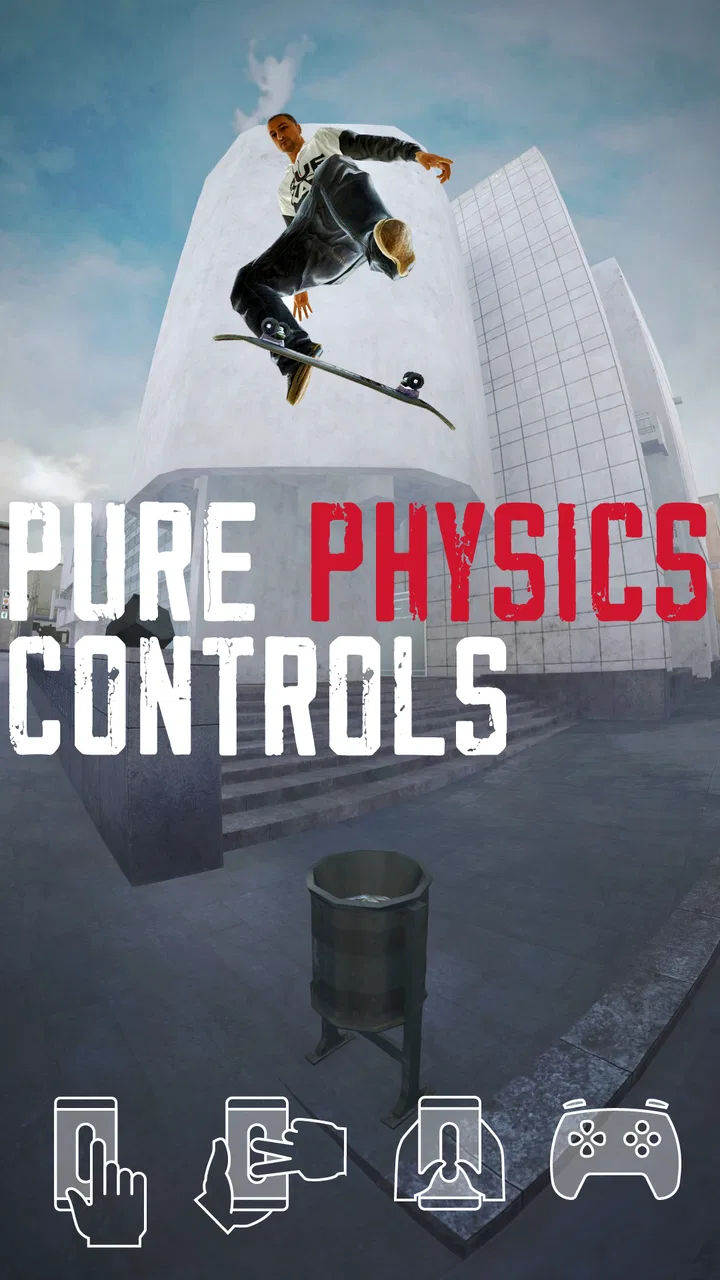
The board responds to finger movement rather than a fixed collection of virtual buttons. That gives the game its strongest identity, but it also explains the early friction. A button-based skateboarding game usually lets me think about the trick first and the input second. Here, the input is part of the trick. The direction, speed, and timing of the gesture all influence what happens.
I recommend using a relaxed grip and keeping the phone or tablet stable. Small accidental movements matter more than they would in many casual sports games. If I play while walking, holding the device with one hand, or constantly shifting my thumb position, I make the game harder for reasons that have nothing to do with skating skill. A steady setup is not a special accessory; it is part of playing well.
Another practical habit is to watch the board instead of staring at the score. The score tells me whether the result was valuable, but the board shows why it worked or failed. I pay attention to the moment the deck begins to rotate, the position of the wheels during the descent, and whether I am trying to land too far toward one end. This visual reading gradually replaces guesswork.
Settings and small adjustments worth checking
Before settling into serious practice, I would check the available control and presentation options rather than assuming the default setup is ideal. The right arrangement depends on the size of the screen and the way I hold the device. On a larger tablet, I have more room to make deliberate gestures, while a smaller phone can make precise movement feel cramped. That difference can change whether a trick feels demanding or simply awkward.
I also prefer to keep the visual presentation clear during practice. Extra distractions make it harder to read the board’s rotation and landing angle. If I am learning, I want to see the movement plainly. Once a trick feels familiar, I can focus more on chaining it into a line. This is a small distinction, but it prevents me from judging a control problem when the real issue is that I am not watching the right part of the screen.
The game is rated Everyone, which makes it approachable for a broad audience, but that should not be confused with being effortless. The age rating describes the content, not the learning curve. A younger player can understand the objective quickly, yet may still need time to develop the fine motor control required for consistent landings. I would introduce it as a practice game, not as an instant pick-up-and-win experience.
It is also worth remembering that this is a paid download at $1.99, while in-app purchases range from $0.99 to $99.99 per item. I would decide in advance how much of the optional content I actually want. The initial purchase makes sense for someone who values the core skating experience, but players who dislike any additional spending should be cautious about browsing optional purchases impulsively. The best value comes from treating the main game as a skill-based toy rather than feeling obliged to collect everything available.
Faster patterns, repeatable habits, and where skill starts to show
Once the basic movement becomes comfortable, I stop trying to improvise every action. Experienced play is less about frantic gestures and more about repeatable patterns. I use the same type of setup for a familiar trick, leave enough space for the landing, and only add complexity after the first movement is stable. This makes a line look smoother because each action has a purpose instead of being a desperate reaction to the previous one.
A useful pattern is to practice the approach separately from the trick. I first learn how much speed I normally carry into a feature, then I test the movement. If I change both speed and gesture at the same time, I cannot tell which variable caused the result. Keeping one element consistent gives me a clearer answer and makes improvement faster.
I also avoid repeating a failed attempt immediately without changing anything. After a miss, I identify one likely cause: poor alignment, late rotation, too much movement, or an unstable landing. Then I alter only that part. This is more productive than making a completely different gesture every time. The game rewards this kind of deliberate adjustment because the controls are physical enough to reveal small differences.
For short sessions, I like a three-stage routine. I begin with a few comfortable movements to regain the feel of the board, spend the middle of the session testing one difficult idea, and finish with something dependable. The opening reduces the shock of returning after a break, the middle provides progress, and the final successful attempt keeps the session from ending on pure frustration. It is a simple workflow, but it makes the game easier to enjoy regularly.
Turning practice into lines instead of isolated tricks
Individual tricks are satisfying, but the stronger test is linking them without losing control. I found it better to choose a line that is slightly below my maximum ability and make it clean before adding another element. A shorter, reliable sequence teaches timing and recovery. A flashy sequence that fails at the first transition teaches much less.
Transitions deserve special attention. A trick may work perfectly when performed alone, yet fall apart when I carry speed into the next feature. In those moments, the issue is not necessarily the trick itself. I may be landing with the board pointed in an inconvenient direction or leaving too little room to prepare. Watching the space after the landing is therefore just as important as watching the trick in the air.
This is one place where True Skate differs from many casual sports alternatives. In a typical arcade game, the main challenge is choosing the right move at the right prompt. Here, the challenge is maintaining a physical relationship with the board. That makes success slower, but it also gives a clean line more personal satisfaction. I feel that I performed it rather than selected it.
Compared with console-style skateboarding games, the mobile format is more immediate but less forgiving in a different way. I can start quickly and practice anywhere, but I do not have physical sticks and buttons to separate movement from camera control or trick selection. Compared with simple endless runners, it offers much deeper control but far less instant momentum. The right comparison is not “which game has more content”; it is “do I want to learn a tactile system or receive quick arcade feedback?”
How I handle failed landings and inconsistent results
Inconsistent results are part of the experience, especially at the start. I do not interpret one successful attempt as mastery. Instead, I repeat the same action until I can explain the result. If a trick works only when I am lucky, I consider it unfinished. That mindset helps because the game can produce a strong emotional swing: a clean landing feels excellent, while a tiny mistake can erase a promising line.
Finger placement matters more than I expected. If I begin each swipe from a different position, my gestures become difficult to compare. I try to use a comfortable, repeatable starting area and keep my hand relaxed. This does not turn the controls into buttons, but it removes unnecessary variation. Players with larger fingers may prefer a tablet for practice, while players who want portability may accept a more demanding experience on a phone.
I would also avoid playing when the screen is dirty or when the device is sliding around. That sounds obvious, but touch-based precision depends on consistent contact. A missed gesture caused by the surface is especially annoying because it teaches the wrong lesson. Keeping the device stable and the screen clean is one of the simplest ways to make the game feel more predictable.
Advanced limits and the kind of player who should skip it
The biggest limitation is that the game asks for patience without always giving immediate explanation. I can understand the objective, but I still need to discover a reliable relationship between gesture and result through repetition. Players who want a detailed tutorial, automatic trick assistance, or a strong narrative reason to continue may find the experience sparse.
It is also not the best choice for someone looking for competitive multiplayer energy or a traditional sports season. My enjoyment comes from practicing and refining movement, not from managing a team, completing a fixture list, or constantly comparing myself with other players. If my priority is fast matches and obvious progression, another sports game would probably serve me better.
The paid entry point is another consideration. I like paying once for a focused game, but the presence of optional purchases means I would read the purchase screens carefully before spending more. The core appeal is already clear without treating every extra as necessary. For me, the sensible approach is to buy it for the tactile skating, then decide later whether any optional addition genuinely improves my play.
The current version is 1.6.9, and the game supports devices running Android 7.0 or later. That makes it accessible on a wide range of compatible devices, although actual comfort still depends on screen size, responsiveness, and how smoothly the device handles touch input. A phone that technically meets the requirement may still be less pleasant for precise practice than a newer or larger device.
Because the game is built around physical control, accessibility can vary from person to person. Someone who finds repeated swiping uncomfortable may not enjoy extended sessions, even if the content itself is suitable for Everyone. I would recommend trying a short session first and paying attention to hand fatigue. The game is easy to understand, but that does not mean every player will find its gestures comfortable.
What makes long-term mastery worthwhile
For me, the lasting appeal comes from the gap between “I know what I want to do” and “I can do it consistently.” That gap gives the game its depth. A new player can perform something satisfying fairly early, but reliable lines require observation, timing, and restraint. The improvement is subtle rather than dramatic, which is exactly why it feels rewarding to people who enjoy skill-building.
There is also value in using the game as a concentration exercise. I cannot play well while half-watching another screen because the board’s position changes too quickly for careless attention. A short, focused session can feel more refreshing than a longer session of an easier arcade game. On the other hand, that same concentration requirement makes it a poor choice when I only want passive entertainment.
My most effective advanced habit is to keep a mental record of successful setups. I remember the approach, the amount of room I needed, and the kind of gesture that produced a stable landing. I do not need a formal spreadsheet; I simply try to reproduce the conditions instead of relying on memory of the trick alone. This is where experienced users gain an advantage: they repeat useful preparation, not just impressive outcomes.
I also learn to accept a lower score when it produces a better line. Chasing maximum points can encourage risky gestures and ruin the flow. If my goal is consistency, I choose control over spectacle. If my goal is experimentation, I accept more failures. Deciding which mode I am in before starting prevents me from judging a practice session by the wrong standard.
My verdict after living with the board
True Skate is strongest when I treat it as a touch-controlled practice space, not as a conventional arcade sports game. The direct input gives every successful movement a satisfying sense of ownership, and the short-session format makes it easy to return to. The developer, True Axis, has built something that can occupy a useful middle ground: more demanding than a casual trick game, but more convenient than a full console skateboarding session.
I would recommend it to players who enjoy learning systems, repeating movements, and improving through small adjustments. It is particularly good for someone who wants a sports game that can be played in brief focused bursts, or for a skateboarding fan who appreciates the difference between selecting a trick and physically guiding one. The large existing audience, including around 13 thousand written reviews, suggests that this focused approach has connected with many players.
I would skip it if I need immediate rewards, a deep story, simple button controls, or a clear competitive structure. I would also think twice if precise swiping is uncomfortable or if I tend to lose patience after several failed attempts. The game does not hide its central demand: improvement comes from paying attention to what the board is doing and changing one part of the attempt at a time.
At its best, a session ends with a line that I can repeat rather than a lucky trick I may never see again. That is the standard I use to judge it. It is not a universal skateboarding game, and its optional purchases mean I would approach the wider package thoughtfully, but the core experience is distinctive. If you want a mobile sports game where mastery grows from your own hands, True Skate is worth considering. If you want effortless skating, choose something more arcade-focused instead.
FAQs for True Skate
01What is True Skate, and what kind of gameplay does it offer?
True Skate is a realistic skateboarding simulation for Android and iOS that focuses on board control rather than traditional character movement. You use finger gestures to push, steer, ollie, grind, and perform tricks, while the physics-based gameplay makes balance and timing important. It feels more like controlling an actual skateboard, so beginners may need practice before landing advanced combinations consistently.
02Is True Skate free to download and play?
True Skate can usually be downloaded for a small one-time price, although availability and pricing may vary by platform or region. The base game provides access to core skating features, but additional skateparks, customization options, and other content may require in-app purchases. It is a good idea to check the current store listing so you understand exactly what is included before downloading.
03Does True Skate require an internet connection?
Many of True Skate’s main skating activities can be enjoyed offline after the necessary content has been installed. This makes it suitable for short sessions while traveling or when mobile data is unavailable. However, an internet connection may be needed for downloading extra skateparks, completing purchases, receiving updates, accessing certain online features, or synchronizing account-related content, depending on your device and game version.
04Is True Skate suitable for beginners?
True Skate is accessible to new players, but it is not an instant, pick-up-and-play arcade game. The controls are sensitive, and successful tricks depend on finger placement, speed, timing, and landing position. The early learning curve can feel demanding, especially if you have never played a physics-based skateboarding game. With practice, the precise controls become rewarding and allow much more creative skating.
05What devices and features are needed to play True Skate comfortably?
True Skate generally works on many modern Android and iOS devices, but performance can vary according to hardware, operating-system version, and available storage. A responsive touchscreen is especially important because nearly every trick depends on accurate swipes and taps. Before installing, check the official Google Play or App Store requirements, and make sure your device has enough space for the game and any optional skatepark downloads.
Pros
- Realistic physics make every trick feel satisfying to land.
- Large selection of skateparks offers varied challenges and layouts.
- Simple touch controls are easy to learn but reward precise timing.
- Customizable boards and decks let you personalize your skating experience.
- Offline play makes it convenient for travel or areas without internet.
Cons
- Many additional skateparks and features require separate purchases.
- The learning curve can feel steep for players new to skateboarding games.
- Some controls may feel awkward on smaller phone screens.
- Progress can become repetitive when practicing similar lines and tricks.
- Ads or purchase prompts may interrupt the experience for some players.

True Skate
Gallery